
Part 1 covered the core concepts behind Trident's DOM: type descriptions, nodes, properties, and adapters. The keymap editor is one of the smallest asset editors in the engine, so it is a compact example of those pieces working together.
One point I forgot in Part 1: the DOM is an authoring-time system used by the editor and asset builder. The game runtime loads cooked binary assets and contains no DOM nodes, adapters, or schemas. Its bubbling reactive events, boxed data, and architectural weight also make it unsuitable for performance-sensitive runtime code.
#The schema
Here is the complete schema for the keymap asset type:
<Schema Namespace="KeymapEditor.Models" Usings="Trident.Input">

    <Type Name="KeyComboInput">
        <Property Name="Button" Type="InputButton" />
        <Property Name="Axis" Type="InputAxis" />
    </Type>

    <Type Name="AxisInput">
        <Property Name="Axis" Type="InputAxis" />
    </Type>

    <Type Name="OneButton">
        <Property Name="Button" Type="InputButton" />
        <Property Name="Value" Type="float" />
    </Type>

    <Type Name="TwoButton">
        <Property Name="LowerButton" Type="InputButton" />
        <Property Name="UpperButton" Type="InputButton" />
        <Property Name="LowerValue" Type="float" />
        <Property Name="UpperValue" Type="float" />
    </Type>

    <Type Name="ButtonInputValueButton">
        <Property Name="Button" Type="InputButton" />
    </Type>

    <Type Name="ButtonInputValueAxis">
        <Property Name="Axis" Type="InputAxis" />
        <Property Name="Operation" Type="AxisBoundaryOperation" />
        <Property Name="ReferenceValue" Type="float" />
    </Type>

    <Type Name="ButtonEntry">
        <Property Name="Key" Type="string" Default="string.Empty" />
        <Property Name="Trigger" Type="DomVariant" SubTypes="ButtonInputValueButton,ButtonInputValueAxis" />
    </Type>

    <Type Name="AxesEntry">
        <Property Name="Key" Type="string" Default="string.Empty" />
        <Property Name="Modifier" Type="InputModifier" />
        <Property Name="Value" Type="DomVariant" SubTypes="AxisInput,KeyComboInput,OneButton,TwoButton,AxesEntry" />
    </Type>

    <Type Name="KeyMap">
        <Property Name="Buttons" Type="DomNode[]" SubType="ButtonEntry" />
        <Property Name="Axes" Type="DomNode[]" SubType="AxesEntry" />
    </Type>
</Schema>
That is the entire data model for keymaps. KeyMap is the root type with two collections: Buttons (a list of ButtonEntry nodes) and Axes (a list of AxesEntry nodes). The source generator reads this at compile time and produces the type descriptions, adapters, and registry wiring rather than requiring manual boilerplate.
#DomVariant
The interesting bit here is DomVariant. Look at the AxesEntry type:
<Property Name="Value" Type="DomVariant" SubTypes="AxisInput,KeyComboInput,OneButton,TwoButton,AxesEntry" />
A DomVariant is a discriminated union for DOM properties. It says: this property holds exactly one node, but that node can be any of the listed types. At runtime, it stores a DomDescriptionVariant which tracks the currently selected type and its node instance.
In the keymap, an axis binding's value can be:
AxisInput: a raw axis reading (e.g. a joystick axis).KeyComboInput: a button combined with an axis (e.g. left stick X).OneButton: a single button mapped to a float value.TwoButton: two buttons mapped to lower and upper float values (e.g. LeftArrow/RightArrow for -1/+1).AxesEntry: a recursive reference to another axis entry, allowing composition.
The property grid renders this as a dropdown. The user picks which variant they want, and the grid swaps in the matching fields below it. The ButtonEntry type uses the same mechanism for its Trigger property, which can be either ButtonInputValueButton or ButtonInputValueAxis.
Here is what that looks like in practice:
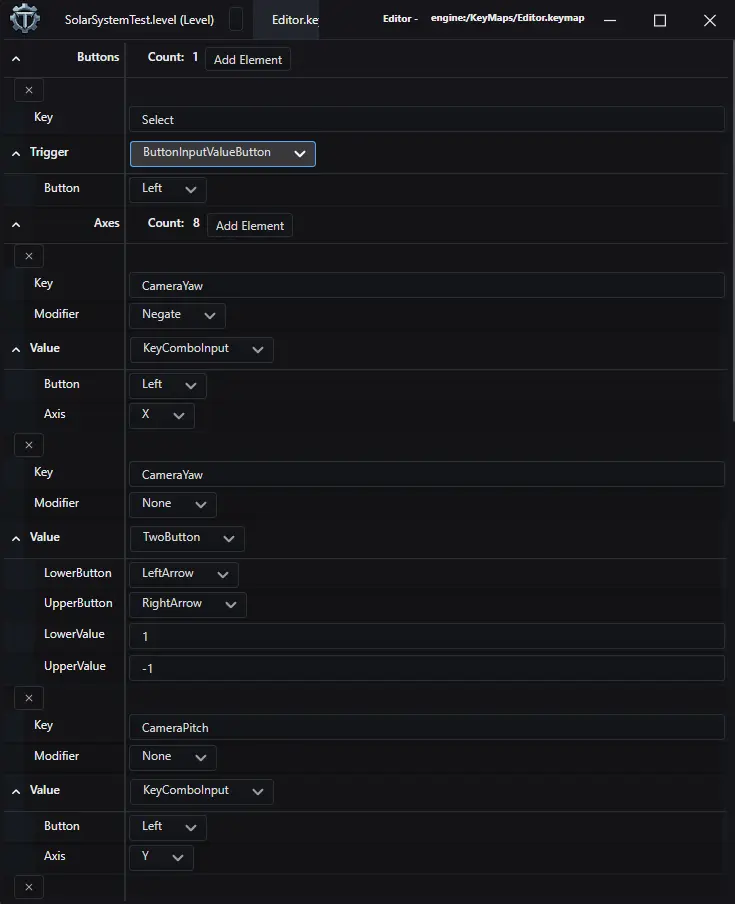
(Excuse the theme, it was still a work in progress.)
The coloured dropdown in each entry is the DomVariant selector. Switching it replaces the child properties underneath. In the screenshot, the first CameraYaw binding uses KeyComboInput (Button + Axis), the second uses TwoButton (LowerButton + UpperButton with float values), and CameraPitch uses KeyComboInput. The Trigger field on the button entry shows ButtonInputValueButton selected. The property grid generates this UI from the schema.
The generated adapter exposes this through a typed Switch method:
axisEntry.Value.Switch<AxisInput, KeyComboInput, OneButton, TwoButton, AxesEntry>(
    axisInput   => { /* handle AxisInput */ },
    keyCombo    => { /* handle KeyComboInput */ },
    oneButton   => { /* handle OneButton */ },
    twoButton   => { /* handle TwoButton */ },
    nestedEntry => { /* handle recursive AxesEntry */ });
This gives you exhaustive matching at compile time. If I add a variant to the schema and forget to handle it somewhere, the code won't compile. It can be a bit annoying having to trudge through the fixes if you've made an early structural mistake, but the validation is worth it.
#The editor
The keymap editor is tiny. These are all its source files.
KeymapDocumentType.cs declares the document type with its display name, colour, file extension, and factory method:
using Avalonia.Media;
using EditorCore.Documents;
using KeymapEditor.Models;

namespace KeymapEditor.Documents;

public sealed class KeymapDocumentType() : StandardDomDocumentType<KeymapDocument, KeyMap>(
    "Key Map",
    Color.Parse("#550f97"),
    [
        new SerializeFormat("Key Map", "*.keymap"),
    ],
    KeyMap.Create);
KeymapDocument.cs wraps the DOM node in a document:
using EditorCore.Documents;
using KeymapEditor.Models;

namespace KeymapEditor.Documents;

public sealed class KeymapDocument : DomDocumentBase, IDocumentFactoryMethod<KeyMap>
{
    public KeymapDocument(DomDocumentType documentType, KeyMap keymap) : base(documentType, keymap.Adaptee)
    {
        this.Keymap = keymap;
    }

    public KeyMap Keymap { get; }

    public static IDocument Create(DomDocumentType type, KeyMap domNode)
    {
        return new KeymapDocument(type, domNode);
    }
}
KeymapAssetTypeHandler.cs wires the document to its view:
using EditorCore;
using EditorCore.Documents;
using KeymapEditor.Documents;
using KeymapEditor.Parts.KeymapDocumentHost;
using Microsoft.Extensions.DependencyInjection;
using Trident.Core.Errors;
using Trident.SolarLib.Avalonia;

namespace KeymapEditor;

public sealed class KeymapAssetTypeHandler(KeymapDocumentType domDocumentType) : IAssetTypeHandler
{
    public bool SpawnInNewWindow { get; } = false;

    public DomDocumentType DocumentType { get; } = domDocumentType;

    public Result<(ViewModelBase ViewModel, IViewFor)> CreateTopLevelView(
        IServiceScope scope, IDocument document)
    {
        if (document is not KeymapDocument keymapDocument)
        {
            return new Error("Document is not a KeymapDocument");
        }

        scope.ServiceProvider.GetRequiredService<ScopedDocument>().Document = keymapDocument;
        scope.ServiceProvider.GetRequiredService<ScopedDocument<KeymapDocument>>().Document
            = keymapDocument;

        KeymapDocumentHostViewModel vm =
            scope.ServiceProvider.GetRequiredService<KeymapDocumentHostViewModel>();
        KeymapDocumentHost view =
            scope.ServiceProvider.GetRequiredService<KeymapDocumentHost>();
        view.DataTemplates.Add(scope.ServiceProvider.GetRequiredService<ViewLocator>());
        view.ViewModel = vm;

        return (vm, view);
    }
}
BootstrapperExtensions.cs registers everything with the DI container:
using EditorCore.Extensions;
using KeymapEditor.Documents;
using KeymapEditor.Parts.KeymapDocumentHost;
using Microsoft.Extensions.DependencyInjection;
using KeyMap = Trident.Input.KeyMapping.KeyMap;

namespace KeymapEditor;

public static class BootstrapperExtensions
{
    public static IServiceCollection AddKeyMapEditor(this IServiceCollection serviceCollection)
    {
        serviceCollection.AddAssetType<KeymapDocumentType, KeyMap,
            KeymapAssetTypeHandler, KeymapDocument>(".keymap");
        serviceCollection.AddViewAndViewModel<KeymapDocumentHost, KeymapDocumentHostViewModel>();

        return serviceCollection;
    }
}
KeymapDocumentHost.axaml is the entire UI. One DomPropertyEditor control, bound to the root DOM node:
<UserControl xmlns="https://github.com/avaloniaui"
             xmlns:x="http://schemas.microsoft.com/winfx/2006/xaml"
             xmlns:d="http://schemas.microsoft.com/expression/blend/2008"
             xmlns:mc="http://schemas.openxmlformats.org/markup-compatibility/2006"
             xmlns:propertyEditor="clr-namespace:EditorCore.Parts.PropertyEditor;assembly=EditorCore"
             xmlns:keymapDocumentHost="clr-namespace:KeymapEditor.Parts.KeymapDocumentHost"
             mc:Ignorable="d" d:DesignWidth="800" d:DesignHeight="450"
             x:Class="KeymapEditor.Parts.KeymapDocumentHost.KeymapDocumentHost"
             x:DataType="keymapDocumentHost:KeymapDocumentHostViewModel">
    <ScrollViewer VerticalScrollBarVisibility="Visible" VerticalSnapPointsAlignment="Far">
        <propertyEditor:DomPropertyEditor
            DomNode="{Binding KeymapData}"
            ValueEditorFactory="{Binding ValueEditorFactory}"
            NamedValueEditorFactory="{Binding NamedValueEditorFactory}"
            Grid.IsSharedSizeScope="True" />
    </ScrollViewer>
</UserControl>
KeymapDocumentHost.axaml.cs has nothing beyond the constructor:
using Trident.SolarLib.Avalonia;

namespace KeymapEditor.Parts.KeymapDocumentHost;

public partial class KeymapDocumentHost : ReactiveUserControl<KeymapDocumentHostViewModel>
{
    public KeymapDocumentHost()
    {
        InitializeComponent();
    }
}
KeymapDocumentHostViewModel.cs passes the root DOM node and the value editor factories to the view:
using EditorCore.Parts.PropertyEditor;
using JetBrains.Annotations;
using KeymapEditor.Documents;
using Tools.Core.Dom;
using Trident.Core.Extensions.DependencyInjection;
using Trident.SolarLib.Avalonia;

namespace KeymapEditor.Parts.KeymapDocumentHost;

[UsedImplicitly]
public sealed class KeymapDocumentHostViewModel(
    KeymapDocument document,
    Keyed<IPropertyValueEditor, Type> valueEditorFactory,
    Keyed<IPropertyValueEditor, string> namedValueEditorFactory
)
    : ViewModelBase
{
    public DomNode KeymapData { get; } = document.Keymap.Adaptee;

    public Keyed<IPropertyValueEditor, Type> ValueEditorFactory { get; } = valueEditorFactory;

    public Keyed<IPropertyValueEditor, string> NamedValueEditorFactory { get; } = namedValueEditorFactory;
}
The editor is seven files, most under 20 lines; nearly all of them wire into shared editor services. DomPropertyEditor walks the DOM tree and builds fields from its type descriptions, including collection controls and variant dropdowns. DOM change notifications feed the document's dirty flag. The project contains no keymap-specific property rendering, collection editing, DOM serialisation, or dirty tracking.
#Cooking
The remaining piece is cooking. At build time, the asset builder cooks keymap files into a binary format the game can load directly. Here is the complete processor:
using KeymapEditor.Models;
using MemoryPack;
using Tools.Core;
using Tools.Core.Dom.Serializer;
using Trident.Core.Errors;
using Trident.Input.KeyMapping;
using Trident.Input.Loaders;

namespace AssetBuilder.AssetProcessors.KeyMap;

public class KeyMapProcessor : IAssetProcessor
{
    public static int StaticVersion => 3;

    public int Version => StaticVersion;

    public ValueTask<ProcessResult> Process(ProcessRequest request)
    {
        string source = request.Data.ReadString(request.Encoding).Trim('\ufeff');
        Result<KeymapEditor.Models.KeyMap> asset =
            JsonDomSerializer.Deserialize<KeymapEditor.Models.KeyMap>(source);
        if (asset.IsError)
        {
            return ValueTask.FromResult(
                ProcessResult.Error("Failed to deserialize KeyMap file."));
        }

        List<ButtonBinding> buttonBindings = [];
        List<AxisBinding> axisBindings = [];

        KeymapEditor.Models.KeyMap keyMapFile = asset.Value;
        if (keyMapFile.Buttons != null)
        {
            foreach (ButtonEntry? buttonEntry in keyMapFile.Buttons)
            {
                if (buttonEntry is null)
                {
                    return ValueTask.FromResult(
                        ProcessResult.Error("Invalid button entry: null"));
                }

                buttonEntry.Trigger.Switch<ButtonInputValueButton, ButtonInputValueAxis>(
                    button =>
                    {
                        buttonBindings.Add(new ButtonBinding(buttonEntry.Key,
                            new ButtonBindingInput(button.Button)));
                    },
                    axis =>
                    {
                        buttonBindings.Add(new ButtonBinding(
                            buttonEntry.Key,
                            new ButtonBindingInput(new AxisButtonBinding(
                                axis.Axis,
                                axis.Operation,
                                axis.ReferenceValue))));
                    });
            }
        }

        if (keyMapFile.Axes != null)
        {
            foreach (AxesEntry? axis in keyMapFile.Axes)
            {
                if (axis is null)
                {
                    return ValueTask.FromResult(
                        ProcessResult.Error("Invalid axis entry: null"));
                }

                axisBindings.Add(new AxisBinding(
                    axis.Key,
                    axis.Modifier,
                    CreateAxisBinding(axis)));
            }
        }

        KeyMap_Data dataModel = new(
            request.AssetUri.ToString(),
            buttonBindings.ToArray(),
            axisBindings.ToArray());
        ReadOnlyMemory<byte> data = MemoryPackSerializer.Serialize(dataModel);

        return ValueTask.FromResult(ProcessResult.Success(data));

        AxisBindingInput CreateAxisBinding(AxesEntry axisEntry)
        {
            return axisEntry.Value
                .Switch<AxisInput, KeyComboInput, OneButton, TwoButton,
                    AxesEntry, AxisBindingInput>(
                axis => new AxisBindingInput(axis.Axis),
                keyCombo => new AxisBindingInput(
                    new KeyCombinationAxisButton(
                        keyCombo.Button,
                        new AxisBindingInput(keyCombo.Axis))),
                oneButton => new AxisBindingInput(
                    new OneDAxisButton(oneButton.Button, oneButton.Value)),
                twoButton => new AxisBindingInput(
                    new TwoDAxisButton(
                        twoButton.LowerButton,
                        twoButton.UpperButton,
                        twoButton.LowerValue,
                        twoButton.UpperValue)),
                _ => throw new Exception("Invalid axis entry"));
        }
    }
}
The processor deserialises the JSON keymap file back into the generated DOM adapter types using JsonDomSerializer, walks the structure, and maps each entry to the runtime ButtonBinding and AxisBinding types. DomVariant.Switch matches each variant again here. The final result is serialised with MemoryPack into a compact binary blob.
KeyMap_Data, ButtonBinding, and AxisBinding belong to the Trident.Input module and contain no DOM types. The asset builder converts the editor's DOM representation into that runtime model and serialises it. The game loads the binary output directly.
#Adding an asset editor
Adding a new asset editor in Trident comes down to three things:
- Write a
.schemafile defining the data model. - Write a thin editor shell (document type, document, handler, bootstrapper, a view that hosts
DomPropertyEditor). - Write a processor that maps the DOM types to the runtime data model.
The editor shell is largely identical boilerplate across asset types. The processor is the only part with real domain logic, and even there the generated adapters and DomVariant.Switch keep things straightforward. For my use, that is a reasonable trade.
#Why not automate the conversion from DOM to the runtime binary structure?
I could, but I want runtime types to remain defined by the game rather than editor-based structures. The editor can create DOM nodes from runtime components; inverting that dependency would couple runtime data to editor definitions. That dependency feels icky to me, so I prefer the boundary as it is.